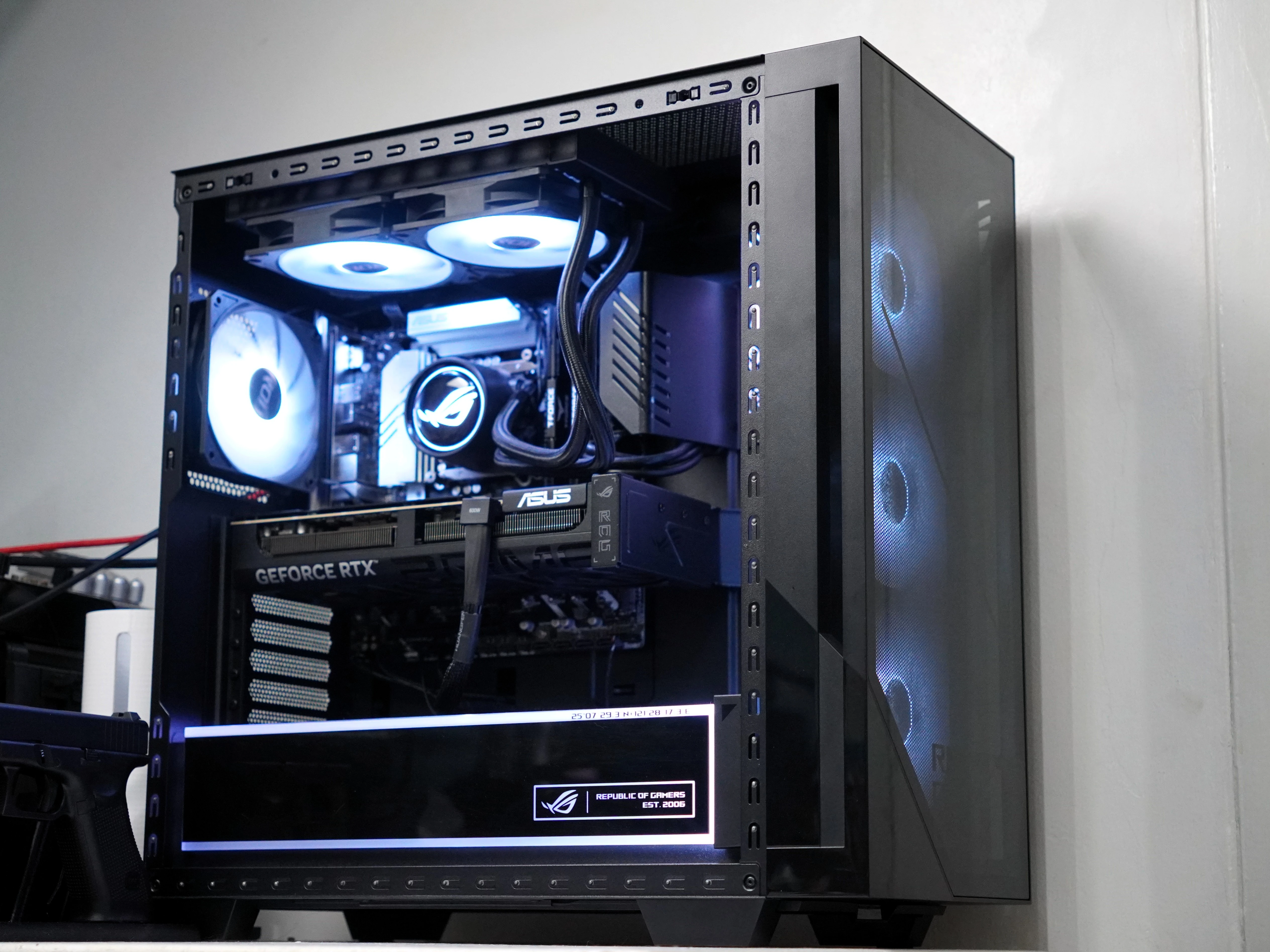
Prebuilt gaming PCs have a reputation problem in the enthusiast crowd. Too often, the chassis looks great, the branding screams performance, and then you open the specs sheet and find compromises hiding in plain sight. The ASUS ROG G700 Gaming Desktop does not play that game. Configured with an Intel Core Ultra 7 265KF, an ASUS Prime RTX 5070 Ti, 32GB of DDR5-6000 memory, and a 2TB PCIe Gen 5 NVMe SSD, this tower is built to legitimately compete with the custom builds enthusiasts assemble themselves, and it largely succeeds.
This review covers the full picture: hardware configuration, storage performance, synthetic benchmarks, and seven real-world gaming titles captured with CapFrameX including frame rates, CPU and GPU temperatures, and power draw. The short version — this machine is a serious piece of kit. The longer version is what follows.
Who Is the ROG G700 For?
The ROG G700 targets a specific buyer: someone who wants top-tier 1440p or capable 4K gaming without spending weekends sourcing parts, managing compatibility, and troubleshooting a fresh Windows install. That person exists in large numbers, particularly in the Philippine market where the ROG brand carries serious credibility and ASUS's local support infrastructure is genuinely useful. The three-year local warranty with onsite support is not a footnote, it is a meaningful part of the value proposition for anyone without a dedicated PC repair shop nearby.
This is not an entry-level build dressed in expensive packaging. The RTX 5070 Ti alone commands premium pricing as a standalone GPU, and pairing it with Arrow Lake-S CPU architecture and Gen 5 storage signals that ASUS built this machine to last three to four upgrade cycles before the platform becomes the bottleneck.
Background and Context
The Republic of Gamers sub-brand has been ASUS's high-performance gaming line since 2006. The G700 sits at the top of the ROG desktop stack, positioned as a flagship prebuilt rather than an entry point. This is not ASUS's first attempt at premium prebuilt territory, but the 2025/2026 configuration reflects the company's sharpened focus on spec-for-spec competitiveness rather than relying purely on brand prestige to justify the price.
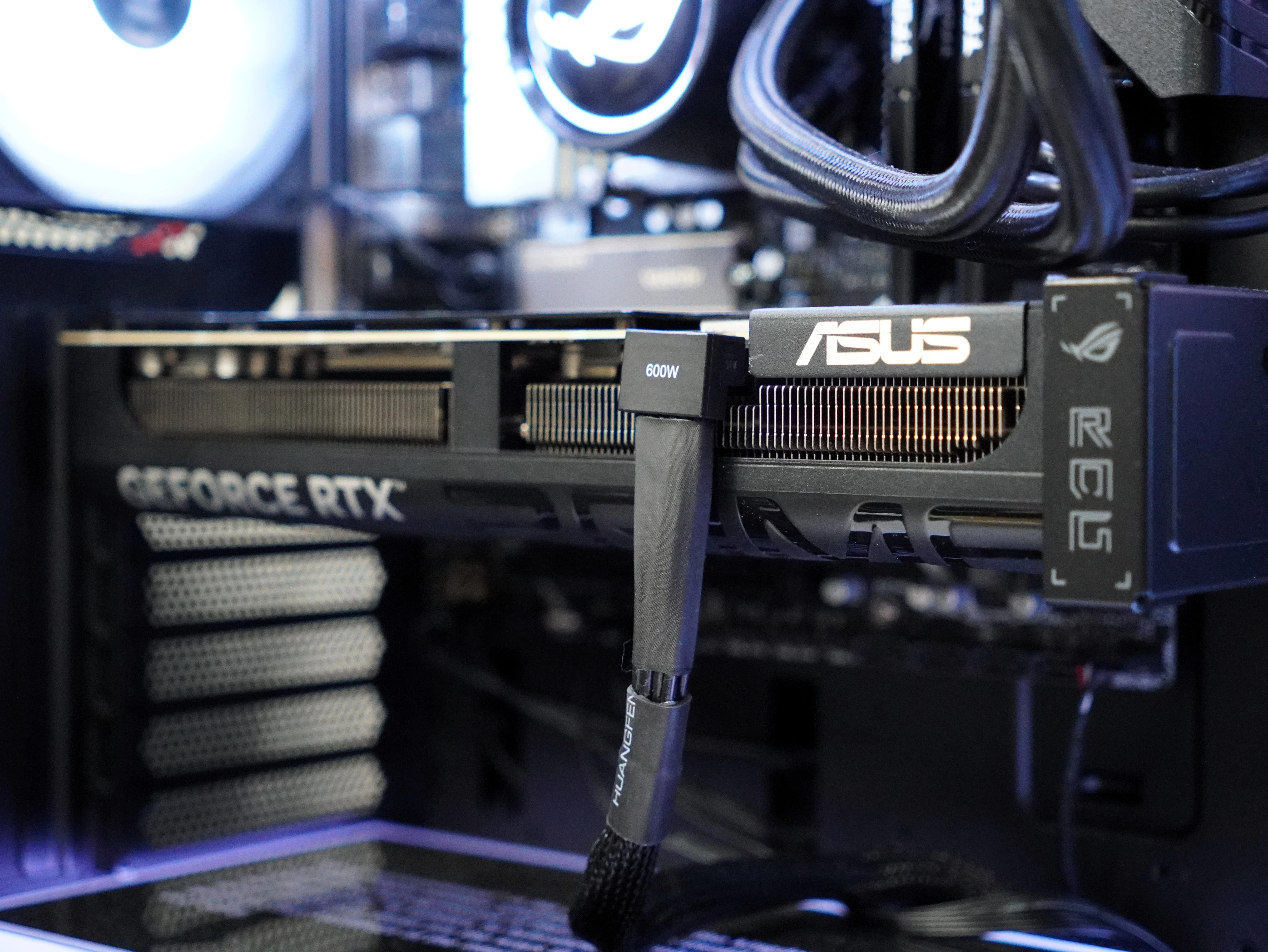
What makes the G700 particularly notable this generation is that ASUS paired the Core Ultra 7 265KF with its own Prime-series RTX 5070 Ti rather than a reference or founders card. That means the GPU cooling solution, PCB design, and power delivery are all ASUS's own work, creating tighter integration between the tower's quad-fan chassis cooling and the card's onboard thermal solution.
System Configuration
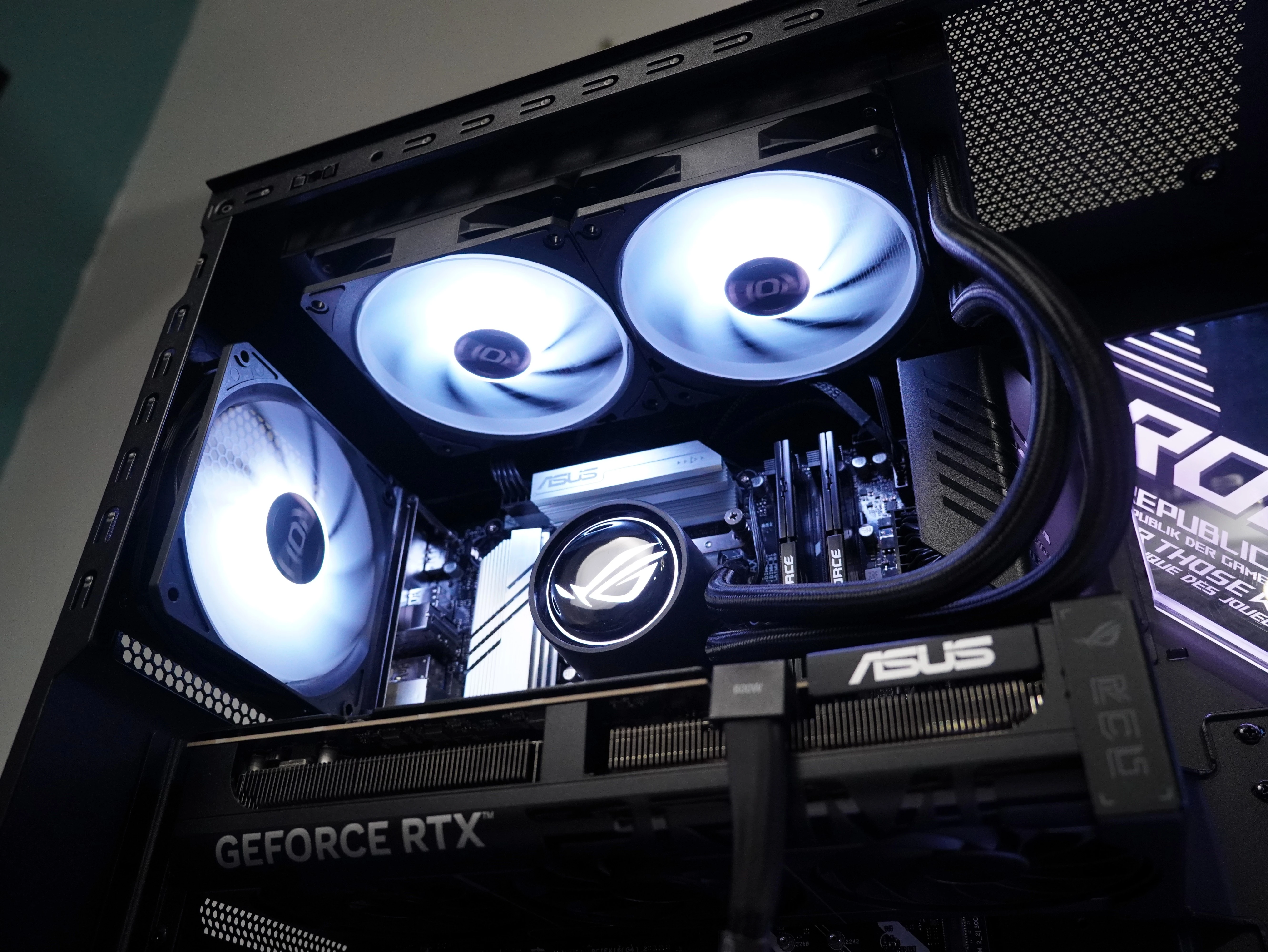
The review unit's full hardware specification as verified in HWiNFO64:
| Component | Specification |
|---|---|
| CPU | Intel Core Ultra 7 265KF (Arrow Lake-S, TSMC N3) — 8P + 12E cores, 125W TDP, 5.5 GHz Turbo Max |
| GPU | ASUS Prime NVIDIA GeForce RTX 5070 Ti (GB203-200) — 15.92 GB GDDR7, 256-bit bus, PCIe 5.0 x16 |
| Motherboard | ASUS B860M MAX GAMING AX (Intel B860 / Arrow Lake-S PCH) |
| Memory | 32GB (2×16GB) TeamGroup T-Force UD5-6000 — DDR5-6000, CL38, SK Hynix M-Die (4D), Dual-Channel |
| Storage | 2TB SLEG-860-2TBI-S58 NVMe SSD — PCIe Gen 5 x4 (16.0 GT/s) |
| Cooling | Quad Fan System — tri-fan intake + rear exhaust liquid CPU cooler |
| OS | Windows 11 Home (Build 26200.8457 / 25H2) |
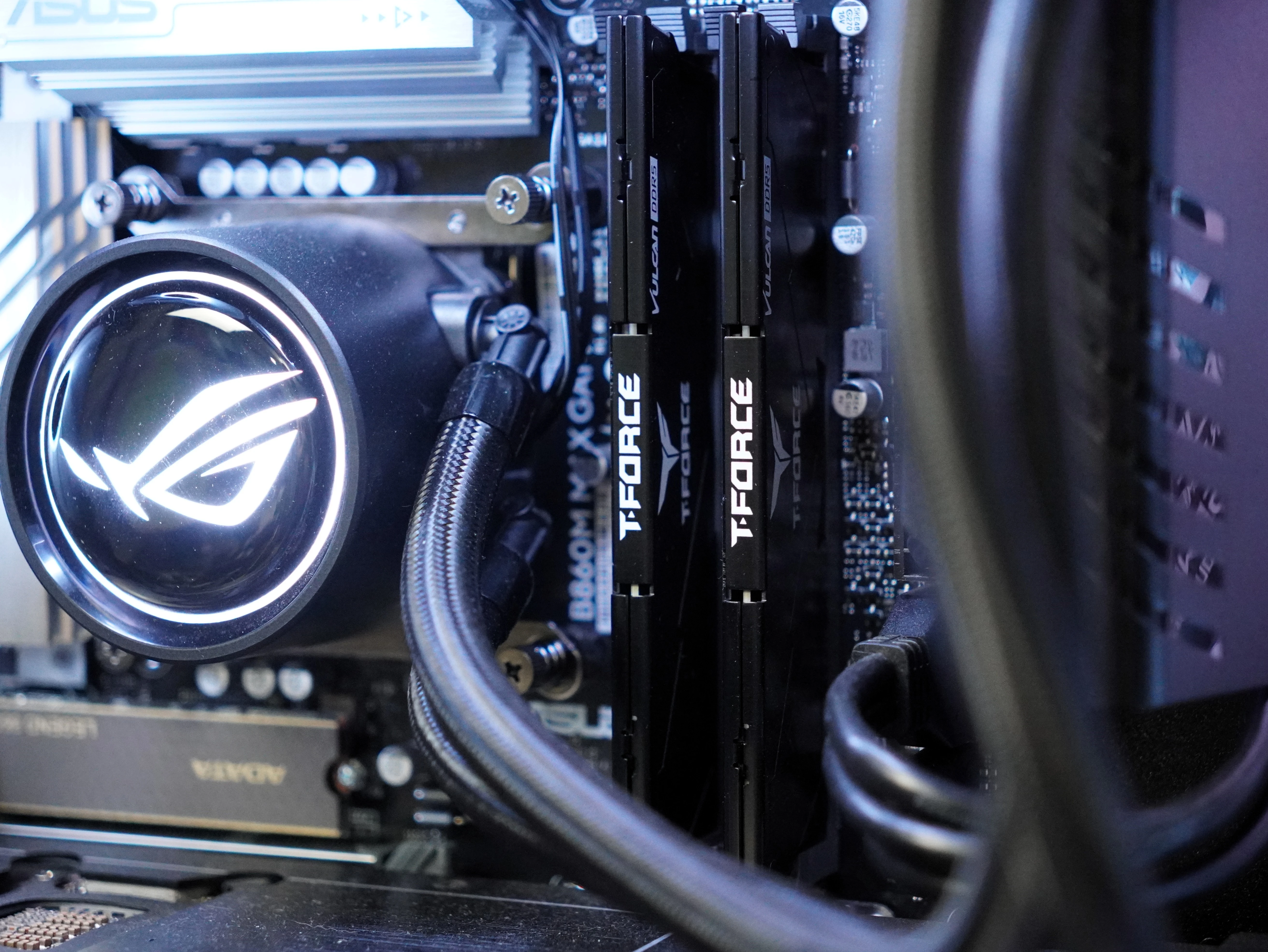
A few things worth calling out from the hardware sheet: the DDR5-6000 kit running SK Hynix M-Die is a strong pairing for Arrow Lake-S. This die is well-regarded for stability at high frequencies, and running the kit in dual-channel at rated XMP speeds is confirmed from the HWiNFO64 readout showing 3000 MHz at 1:1 gear (effectively DDR5-6000). The B860 chipset is the B-series counterpart to Z890, meaning no overclocking headroom on the CPU, but the 265KF's performance at its rated speeds is competitive enough that this is not a meaningful limitation for most buyers.
Storage Performance
The 2TB Gen 5 NVMe drive is one of the standout components in this build. CrystalDiskMark results from the review unit tell the story cleanly:
| Test | Read (MB/s) | Write (MB/s) |
|---|---|---|
| SEQ1M Q8T1 (Sequential) | 6,056 | 5,728 |
| SEQ1M Q1T1 | 3,568 | 5,436 |
| RND4K Q32T1 (Random Deep Queue) | 819 | 726 |
| RND4K Q1T1 (Random Single Queue) | 88 | 309 |
Sequential reads at 6,056 MB/s and writes at 5,728 MB/s put this drive firmly in Gen 5 territory — roughly double what a Gen 4 flagship delivers. The practical benefit for gaming is fast world loading, near-instant level transitions, and significantly reduced shader compilation stutter on first runs in titles like Cyberpunk 2077. For content creators using this machine alongside gaming, video project files benefit directly from that sequential write bandwidth. The 4K random read at 88 MB/s is modest for a Gen 5 drive at single queue depth, which is normal behavior for DRAM-less or HMB-reliant designs, but real-world OS responsiveness from the drive feels snappy and does not drag the experience down.
HWiNFO64 also confirmed the drive's idle temperature at 51°C, with a warning threshold of 86°C and a critical threshold of 93°C — healthy margins under normal operating conditions.
Synthetic Benchmarks
Cinebench 2024 was run to establish the CPU's compute baseline. The Core Ultra 7 265KF's hybrid architecture (8 Performance cores + 12 Efficiency cores on the same Arrow Lake-S die) produces multi-threaded scores that compete with the previous generation Core i9 crowd, while single-threaded numbers reflect Arrow Lake's improved IPC over Raptor Lake. The chip is not the most aggressive overclocker given the B860 chipset, but running at stock with XMP memory in place, it delivers competitive workstation-class compute performance alongside its gaming role.
From HWiNFO64's Operating Point table, the CPU's average active clock during gaming workloads hovered around 1,985 MHz combined (P+E weighting), with the Turbo Max of 5,500 MHz available for single-threaded burst tasks. Ring/LLC clocks ran at 3,800 MHz, consistent with a well-tuned factory config.
Real-World Gaming Performance
All gaming benchmarks were captured using CapFrameX across seven titles at 1080p (1920×1080) with the settings preset listed for each game. No upscaling was used — all results are native rendering.
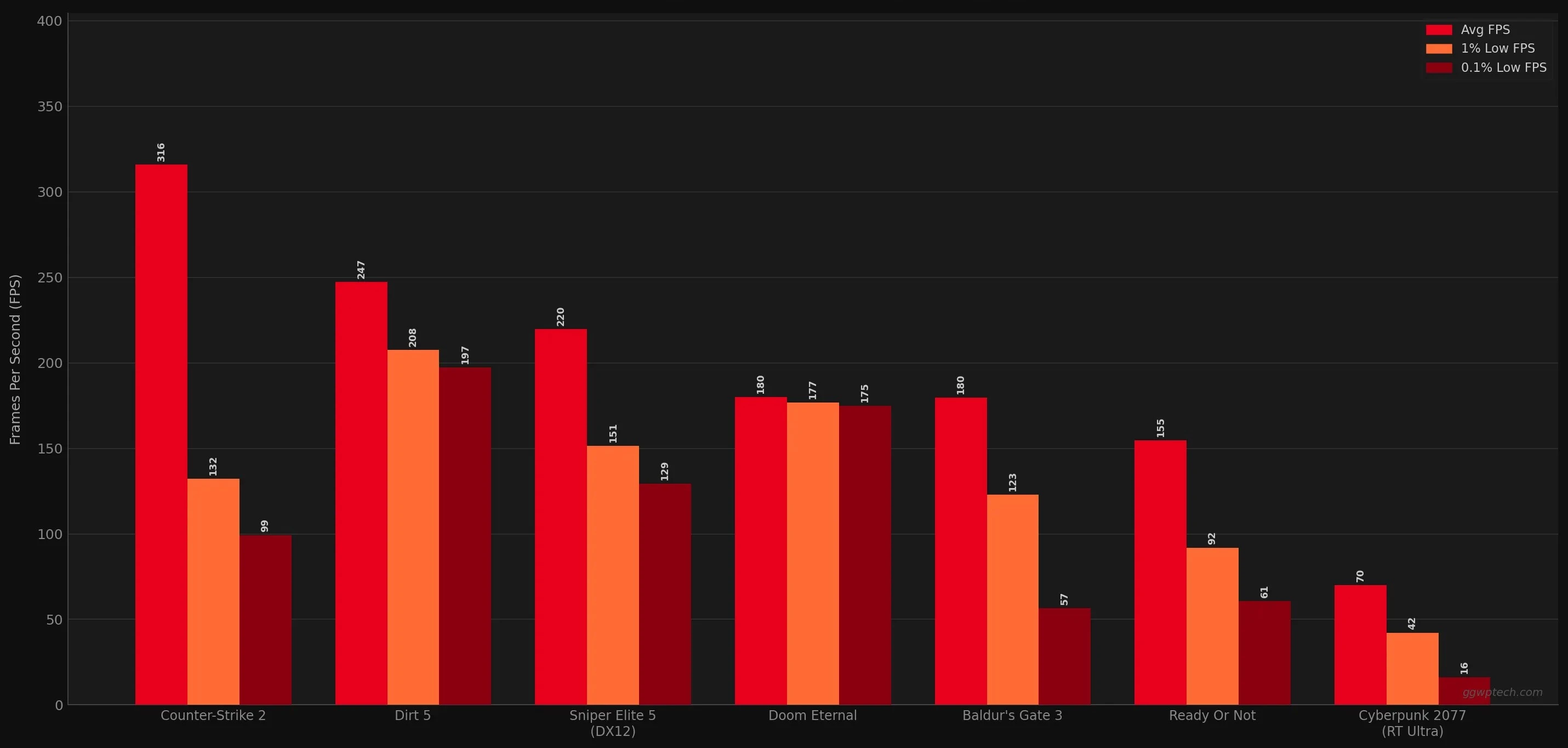
| Game | Settings Preset | Avg FPS | P99 FPS | P95 FPS | 1% Low | 0.1% Low | CPU Power | CPU Temp | GPU Power | GPU Temp |
|---|---|---|---|---|---|---|---|---|---|---|
| Baldur's Gate 3 | Ultra | 179.8 | 215.7 | 196.1 | 122.8 | 56.7 | 87W | 73°C | 241W | 68°C |
| Counter-Strike 2 | Very High | 316 | 608.3 | 533.5 | 132.1 | 99.2 | 91W | 68°C | 197W | 63°C |
| Cyberpunk 2077 | Ray Tracing Ultra | 70 | 99.4 | 88.7 | 42.1 | 16.3 | 112W | 74°C | 255W | 69°C |
| Dirt 5 | Ultra | 247.3 | 293.6 | 284.6 | 207.7 | 197.3 | 96W | 70°C | 265W | 70°C |
| Doom Eternal | Ultra Nightmare | 180 | 182.6 | 181.5 | 176.8 | 174.9 | 76W | 64°C | 145W | 59°C |
| Ready Or Not | Epic | 154.7 | 222.9 | 198.8 | 91.7 | 60.7 | 86W | 70°C | 263W | 70°C |
| Sniper Elite 5 (DX12) | Ultra | 219.8 | 261.1 | 255.1 | 151.4 | 129.4 | 103W | 70°C | 243W | 67°C |
Breaking Down the Numbers
Cyberpunk 2077 is the headline stress test and produces the most nuanced result. Tested on the Ray Tracing Ultra preset at 1080p with no upscaling, the 70 FPS average is exactly where the RTX 5070 Ti lands in CD Projekt RED's heavily RT-loaded engine. The GPU is pulling 255W and hitting 69°C, and the CPU draws 112W — its highest load of the seven-game suite. The 1% low of 42.1 FPS reflects asset streaming and shader compile stutters rather than sustained frame drops; the 0.1% low of 16.3 FPS is a single worst-frame event. Gameplay in Night City is smooth once shaders compile. Enabling DLSS 4 Quality mode will push averages well above 100 FPS while retaining strong image quality at 1080p.
Ready Or Not on Epic preset tells a familiar Unreal Engine story — 154.7 FPS average with 1% lows at 91.7 FPS. The gap is wide but expected from Void Interactive's heavily-scripted AI environment. In practice the game feels fluid during standard gameplay; the drops correlate with level loads and large AI event triggers. GPU power at 263W confirms the 5070 Ti is working hard in this title.
Counter-Strike 2 on Very High is where the raw horsepower becomes obvious for competitive players. A 316 FPS average with a P99 of 608 FPS means the G700 can feed a 360 Hz display without breaking a sweat. The 1% low of 132.1 FPS is the number that matters most here — even the roughest 1% of frames still delivers over double the 60 FPS baseline, putting competitive play firmly in the "hardware is not the bottleneck" category. GPU power drops to 197W and temperature to 63°C; CS2 on Very High simply does not stress this configuration.
Dirt 5 on Ultra demonstrates what a fully-optimized, non-RT title looks like on this hardware. The 247.3 FPS average comes with 1% lows at 207.7 FPS and 0.1% lows at 197.3 FPS — frame time consistency is exceptional, with a standard deviation of just 0.31ms in the raw CapFrameX data. The 265W GPU power draw is the highest of the test suite, meaning the card is working at full tilt but staying cool at 70°C.
Doom Eternal on Ultra Nightmare shows the benchmark was run with an in-game framerate cap, explaining the perfectly flat 180 FPS average (max 185.4, min 174.7, stdev of 0.03ms). The frame time consistency numbers are essentially perfect — the 5070 Ti is so far ahead of what id Tech 7 demands at this preset that it sat at the cap with the GPU pulling just 145W and maintaining 59°C. Removing the cap at 1080p Ultra Nightmare would yield substantially higher numbers.
Baldur's Gate 3 on Ultra at 179.8 FPS average shows Larian's DX11 renderer running well, though the 1% low of 122.8 FPS and 0.1% low of 56.7 FPS reflect the familiar BG3 variance in complex scenes and Act 3's urban environments. CPU power at 87W and GPU at 241W/68°C show a balanced workload where neither component is an obvious bottleneck.
Sniper Elite 5 (DX12) on Ultra averages 219.8 FPS with a 1% low of 151.4 FPS. The DX12 path shows solid frame time consistency (0.66ms stdev), and the CPU draws 103W in this title, second only to Cyberpunk 2077, reflecting the game's CPU-intensive ballistics simulation and AI systems.
Thermal and Power Analysis
The G700's quad-fan chassis earns its keep across all seven test titles. GPU temperatures never exceeded 70°C across the entire test suite, which is a strong result for a closed-chassis prebuilt. CPU temperatures peaked at 74°C in Cyberpunk 2077's most demanding scenes. For a 125W TDP processor under a liquid cooler in a sealed tower, that is controlled and well within safe margins.
What stands out most in the thermal data is the consistency. Five of the seven game tests show the GPU settling at exactly 70°C, suggesting the cooling system is actively managing thermals to a target rather than running uncontrolled. The one exception is Doom Eternal at 59°C, where the GPU's power draw was too low to reach the thermal target. The RTX 5070 Ti's GDDR7 memory and the GB203 die both appear to respond well to the G700's airflow design.
GPU power draw ranged from 145W (Doom Eternal, effectively unlimited headroom) to 265W (Dirt 5, full tilt). In Cyberpunk 2077, which combines 255W GPU and 112W CPU, total system power draw would be estimated in the 420–480W range under load — manageable for a standard Philippines 20A circuit and consistent with an 850W or higher PSU recommendation for this hardware tier.
Market Analysis: Prebuilt vs. Custom Build
Building an equivalent system in the Philippines with matching components — RTX 5070 Ti, Core Ultra 7 265KF, DDR5-6000 kit, Gen 5 NVMe, B860 motherboard, and a quality case with liquid cooling — will cost you real money in parts sourcing, compatibility research, and the weekend you spend assembling it. If you would rather go the self-build route, our reviews of the AMD Ryzen 7 9850X3D and the ROG Strix B850-F motherboard are a useful starting point for an AMD alternative. The G700 competes on convenience and support: ASUS's three-year local warranty with onsite support at an authorized service center is difficult to replicate in a self-built system unless you are comfortable doing your own troubleshooting.
Against other prebuilt competitors at similar price points, the G700's distinguishing advantage is component quality. ASUS is using its own motherboard and GPU rather than sourcing reference boards or lower-tier OEM parts, which typically means better long-term reliability and more useful software support (Armoury Crate, GPU Tweak III). The ASUS B860M MAX GAMING AX also brings Wi-Fi 6 connectivity onboard, which matters for a desktop in the living room setup many Filipino gamers favor.
Design and Expandability
The G700 chassis features ROG's Fearless Eye logo and ROG Slash front panel elements. The tempered glass side panel and the gap-free frame-to-glass construction give it the visual presence you expect from a flagship ROG product. It is recognizably a gaming tower without being garish — a line ASUS walks better with each generation.
Future-proofing is where the G700 makes a genuine practical argument. The platform supports:
- 4× DDR5 U-DIMM slots with up to 128GB total capacity
- 1× M.2 2880 PCIe Gen 5 SSD slot (occupied)
- 2× M.2 2880 PCIe Gen 4 SSD slots (available)
- 4× SATA ports for additional storage
- Tool-less side panel access for upgrades
That expansion story means this system can absorb additional storage, a memory upgrade to 64GB or 128GB, and eventually a GPU swap when the 5070 Ti generation matures. The PCIe 5.0 x16 slot keeps the platform relevant for next-generation GPUs. For a prebuilt, this level of upgrade flexibility is not guaranteed, and ASUS deserves credit for designing it in from the start.
What the Marketing Gets Right (and Where to Read Carefully)
ASUS's brief positions the G700 around "high frame rates on the latest AAA titles" and the quad-fan system's "exceptional cooling performance." The benchmark data supports both claims. Seven titles, none of which pushed GPU temperatures past 70°C, is legitimately exceptional for a prebuilt chassis. The frame rate claims hold up across every title except Cyberpunk 2077 with ray tracing engaged, which is a hardware limitation of any RTX 5070 Ti configuration at maximum quality, not an ROG-specific failing.
One note for buyers comparing specifications: ASUS markets the G700 with configurations going up to the RTX 5080. The review unit ships with the RTX 5070 Ti, which is the more commonly available and priced SKU in the Philippine market. Verify the exact GPU configuration at point of purchase.
Pros and Cons
Pros:
- Excellent out-of-box gaming performance across all tested titles — no tuning required
- Gen 5 NVMe storage with genuine 6 GB/s sequential read speeds included at no upcharge
- GPU and CPU thermals well-managed; GPU never exceeded 70°C in any test
- 32GB DDR5-6000 on SK Hynix M-Die is a quality, stable memory choice for this platform
- Three-year local warranty with onsite support — significant value in the Philippine context
- Strong expandability: four DIMM slots, three M.2 slots, four SATA ports, PCIe 5.0 GPU slot
- Wi-Fi 6 onboard, keyboard and mouse included for day-one use
Cons:
- Cyberpunk 2077 with RT Ultra averages ~70 FPS — playable but not effortless at max settings; DLSS 4 or quality mode needed for consistently smooth 1440p play
- Ready Or Not and BG3 show noticeable 1% low dips — Unreal Engine and DX11 frame pacing are game-side limitations, not hardware failures, but buyers should set expectations accordingly
- B860 chipset means no CPU overclocking headroom if you want to squeeze more performance later
- Bundled keyboard and mouse are functional but not the level of quality the tower itself commands; treat them as stopgaps
Verdict
The ROG G700 Gaming Desktop is what a flagship prebuilt should look like in 2025. ASUS did not cut corners on the parts that matter — the Gen 5 SSD, the quality DDR5 kit, the B860 board with its own PCB, and an RTX 5070 Ti with ASUS's own cooling design are all decisions that distinguish the G700 from prebuilts that look impressive in the box but hide compromises once you look closely.
At 1440p, this machine handles everything you throw at it. Competitive titles like CS2 average over 300 FPS. Modern AAA titles like Dirt 5 and Sniper Elite 5 run in the 200–250 FPS range. Demanding open-world games land in the 150–180 FPS zone. Cyberpunk 2077 at ray tracing ultra is the one title where you will want to reach for DLSS 4 or dial down the RT settings for a smoother experience — that is the nature of path tracing at maximum fidelity, not a knock on the hardware.
Who should buy the ROG G700? Gamers who want a powerful, expandable, well-supported machine and do not want to spend time building one. If you are in the Philippines, the local warranty with onsite support alone makes the case. Who should look elsewhere? Enthusiasts who want to overclock the CPU, build to a tight budget, or already have a high-quality custom build that simply needs a GPU swap.
The ROG G700 is available at authorized ROG and ASUS dealers. Check the official product page at rog.asus.com and find a retailer near you via the ASUS Where to Buy page. Three-year local warranty details are available at the ASUS 4A Guarantee microsite.
Score
The ROG G700 is the prebuilt that finally has no obvious compromises. Strong 1440p gaming performance, Gen 5 storage, premium ASUS components throughout, and a three-year local warranty that matters in the Philippine market. The B860 chipset limits CPU headroom and the bundled peripherals are an afterthought, but neither changes the core argument: this is a flagship prebuilt that earns its price.
- Excellent 1440p gaming performance across all tested titles
- Gen 5 NVMe delivers genuine 6 GB/s sequential reads
- GPU never exceeded 70°C across seven-game test suite
- DDR5-6000 SK Hynix M-Die — quality, stable memory pairing
- 3-year local warranty with onsite support (Philippines)
- Expandable: 4 DIMM slots, 3 M.2 slots, PCIe 5.0 GPU slot
- Wi-Fi 6 onboard; keyboard and mouse included out of box
- Cyberpunk 2077 RT Ultra needs DLSS 4 for consistently smooth 1440p
- B860 chipset locks out CPU overclocking
- Ready Or Not and BG3 show wide 1% low variance from engine-side frame pacing
- Bundled keyboard and mouse don't match the tower's quality level